Method
How Lutshelf looks are made and tested
Every look on Lutshelf is written as a short recipe: how much contrast, where the black and white points sit, which hues move and by how much, what tint goes into shadows and highlights. A script turns the recipe into a 33-point 3D LUT. No AI model is involved, and no look is copied from another pack.
Why the math happens in Oklab
The adjustments are made in Oklab, a color space designed so that changing lightness doesn't shift hue and changing hue doesn't shift lightness. That is why a warm look can warm the highlights without turning skin orange, and a teal look can tint the shadows without turning faces green.
The test every look has to pass
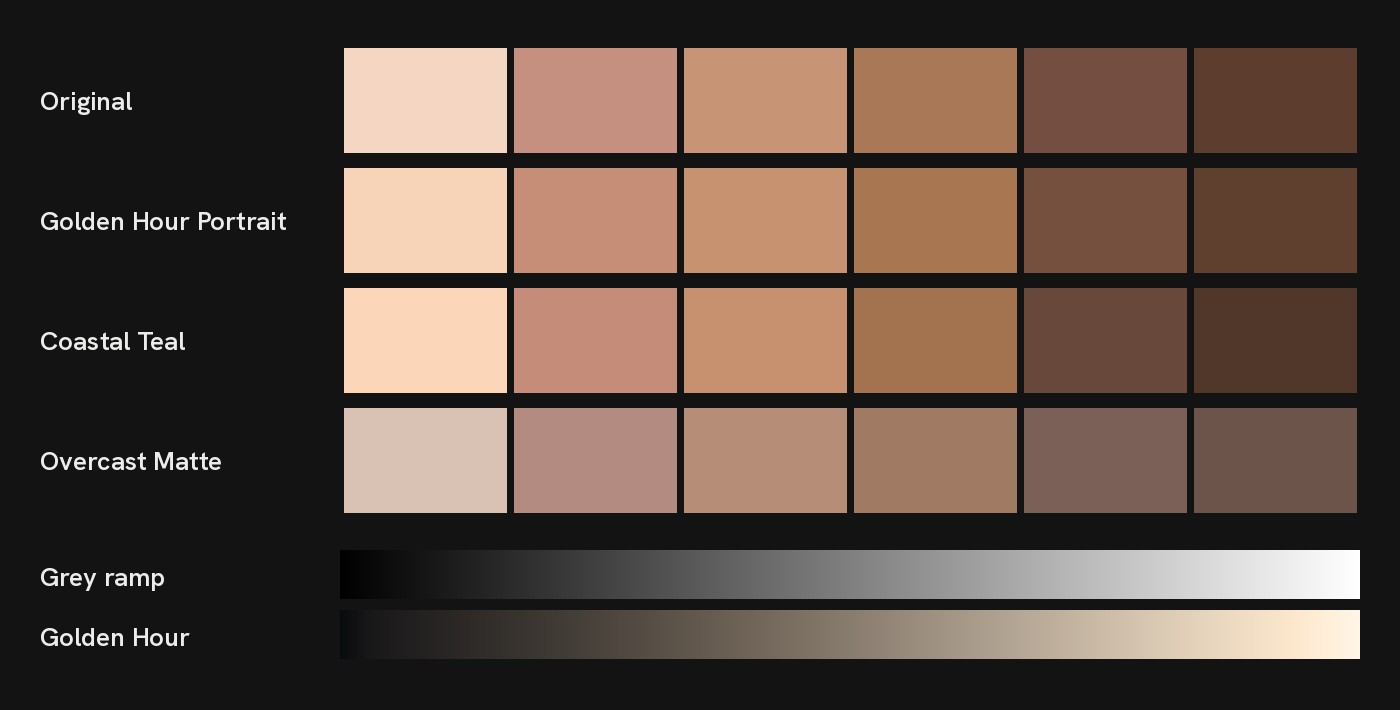
Skin. Six skin samples, from very light to deep, go through the look. If the hue of any of them moves more than 7 degrees, or its color gets more than 30% weaker or stronger, the look goes back for changes. The results are printed on each look's page.
Grey ramp. A smooth ramp from black to white has to stay in order with no reversals and no jumps bigger than 6%. That is what keeps skies and walls free of banding.
Clipping. The test counts how many colors the look pushes into pure white or crushes into pure black that weren't there before. More than 2% and it fails.
Log versions. Camera files are checked separately: 18% grey from the camera has to land at a normal level on a Rec.709 display, and the tonal ramp has to stay smooth.
What the test doesn't promise
It can't know your footage. A LUT reshapes whatever it gets, so a badly exposed or color-cast clip still needs fixing first. And when a look is called film-like, that describes the feel. It isn't a measurement of a real film stock.
The previews
Preview photos are public domain or CC0 images from Wikimedia Commons (credits). The grading on the page happens in your browser with a smaller version of the same LUT, so it is very close to, but not pixel-identical with, the 33-point file you download. You can also test a look on your own photo; it stays on your device.